Showing posts with label smart phones. Show all posts

Wednesday, August 03, 2011

Another Rant Against the Yellow Pages


Last month, my wife asked me to look up the phone number of a local restaurant.

She was writing a note to her sister who is coming to visit and wanted to call the restaurant to see which hotels are located nearby.

(This was a handwritten note, the kind you shove in an envelope with postage.)

She was sitting in the living room with a book as a writing surface as she asked me for the number.

I used my Droid, did a Google voice search, pressed the number and handed the phone to my wife.

While she was talking to the restaurant, I noticed that the book the she was using as a writing surface, was The Phone Book.

It's that time of year again when phone book sales people try and get you to sign up for another year of advertising in the book.

Now days, they will try and sell you on a website too because they know that the book is dying, and being replaced by the web.

Paul Weyland wrote about The Phone Book recently in a newsletter he sends to radio and television sales reps:

Yellow Pages- Despite rumors of its imminent Internet-inspired death, many businesses still feel they absolutely must advertise in the phone book. When many consumers are ready to buy a product or service they pull out the Yellow Pages for information. Advertisers feel that many sales can be traced directly to the phone book. Many cities now have more than one book and for many advertising decision makers that poses a problem. Which book (or books) do you buy? Technology poses another problem for phone book advertisers. Younger people are relying more and more on the Internet for information on businesses. Despite it’s problems, Yellow Page advertising is still very popular, and they’re doing a lot to embrace the Internet and keep their customers.

Here are some of the strengths of the Yellow Pages:
• Perceived as reliable-People turn to the Yellow Pages when they are ready to buy.
• Room to display multiple products and services-Like the newspaper.
• Advertising by section-Yellow Pages can place ads for one client in several different product/service categories.
• Couponing-Like the newspaper, Yellow Page customers can find coupons they can bring directly to the advertiser.
• Ubiquitous-Yellow Pages are everywhere. And usually right next to the telephone.

Like newspaper, Yellow Page advertising does have its drawbacks. Here are some examples:
• High cost-Yellow Pages advertising can be very expensive, particularly when the advertiser is running full-page color ads in several product/service categories. And if you dispute your bill your phone could be cut off.
• You can’t change the copy-The advertiser is stuck with the same copy for a year. That’s a long time, especially if something new you have something new you’d like to say. And what if there’s a mistake in the ad? Too bad. You live with it for a year.
• Passive medium-Again, a Yellow Pages ad doesn’t say anything until you pick it up and turn the pages. Up to that point the book sits in a drawer or under piles of mail.
• Absolutely no competitive protection-When you a consumer shops the Yellow Pages he has the opportunity to shop all of your competitors as well.
• The biggest ads are in the front of the product/service category-Sounds nice, until you think about how many consumers really pick up and handle the phone book. “When you buy a full page ad in our Yellow Pages, we’ll put your ad right in the front of the section!” Fine, except most people thumb through the Yellow Pages from back to front. Try it yourself. Pick up the phone book and look at the way you actually handle it to get to the pawn brokers section. That means that in reality, customers will see the smaller ads before they get to the big, expensive ones in the front of the section.
• Clutter-The Yellow Pages is virtually all ads. For small businesses it’s becoming very expensive to compete in the phone book, particularly if you need multiple listings. For example, if you’re in the heating and air conditioning business you’ll need an ad in heating and another in air conditioning. If you’re in the appliance business you’d need listings in refrigerators, stoves, washing machines, etc.
• Too many books-Clients in many markets are being courted by multiple “Yellow Pages” books. Which book (or books) should you buy?
• The Internet-Many younger people use the Internet for searching out businesses. And there are many different Internet “Yellow Pages”. Older people may have trouble with the Yellow Pages as well. In big cities the books are big and the older you get, the harder it is to read the numbers.

You can read the rest of what Paul wrote here on RBR.com.

When I was in the radio business, we used the book as a directory of potential advertisers.

Now that I moved to the web based world, I can offer marketing solutions that are measurably more cost effective than the book.

Contact me at: SHoward@CirrusABS.com or 260-255-4357.

Sphere: Related Content

Saturday, July 09, 2011

Mobile Mommy


I know a few of these....

(Originally published by Mediapost)

Look, Mom! It's LoSoPhoMo!
What's a single guy like me know about being a Mom? Zippy. Zilch. Nada.

Here's what I do know: Moms are driving an emerging trend that combines location-based services, social sharing, and the camera -- all converged in mom's mobile devices. Said another way, LoSoPhoMo:

  • The Lo is for local
  • The So is for social
  • The Pho is for photo (or video) enabled
  • The Mo is for mobile

It's a powerful combination. What's more, it's an experience that's unique to smartphones and tablets. And when you consider the sheer size, buying power and mobile adoption rates of moms, that's a game-changer for brands looking to connect with them.

Choosy Moms Choose Smartphones

The first indicator that moms are driving the LoSoPhoMo trend is in smartphone sales themselves. According to the 2011 Mobile Mom report, the rate of smartphone purchases among moms has increased 64% in less than two years. And more than half the moms polled at BabyCenter said their smartphone purchases were directly related to becoming a mom. Whoa.

Moms are power users of mobile. They can deftly navigate through the trifecta of mobile search, mobile web, and mobile apps, while multi-tasking a hundred different duties between breakfast and bedtime.

But as mobile search gives way to more app usage by moms (for now, anyway) the shift in focus for brands is now on apps -- an over-abundance of options for every life-stage imaginable:

  • Conception (BioClock)
  • Pregnancy (BabyBump, iPregnancy)
  • Picking a name (Name Shake)
  • Mastering contractions (ContractionMaster) -- sorry fellas, you're really useless now.
  • Breastfeeding (Baby Tracker: Nursing)
  • Potty training (iGoPotty)
  • Documenting poopy diapers (Baby Tracker: Diapers)
  • Keeping tabs on sleeping infant (BabyMonitor)
  • Getting kids to brush their teeth (Time2Brush)
  • And there are oodles of apps for mobile food ordering (and if you're lucky -- curbside service -- a blessing to moms everywhere!)

And so it goes. As kids get older, the apps get richer, and developers everywhere rejoice.

The Media Behavior Institute says that Gen-X moms have the least down time of any moms and the most time spent care-giving. So what do Moms want in apps in light of this insight? We asked one:

"The best apps help me stay organized," says Theresa C., a GenX mother of two, ages five and one. "I keep my grocery list on Ziplist. I've got the usual suspect apps that help me stay current with friends on social networks. I've got a few games that keep me entertained while I'm standing in line at the store. And I've got some specifically for my daughter -- doodling games, learning games. They come in handy at restaurants."

Theresa isn't alone. Moms everywhere seek entertainment and utility before downloading. What's more, 25% of the apps they download are for their kids. (For more info about moms and their apps, follow the conversation at the MomsWithApps group on Facebook. It's a collaborative group of parent app developers seeking to promote quality apps for kids and families.

Even more interesting for consumer products manufacturers, moms are becoming more dependent upon their smartphones when they're out shopping. In a Brunner survey, moms reported they used apps in the store to:

  • Compare prices (49%)
  • Read product reviews (35%)
  • Get and/or redeem coupons (34%)
  • Review nutritional information (31%)

Smarter, faster indeed. There's no question, apps are where it's at (today). But if you're a brand or a developer that's creating an app specific for mom, remember your LoSoPhoMo. The best apps today include at least one or more of these features.


Shaun Quigley is VP, interactive practice area leader for Brunner, an ad agency and digital marketing firm.

Sphere: Related Content

Sunday, July 03, 2011

QR Code Ideas

A couple months ago I received an issue of Fast Company magazine and decided to look for QR Codes.

I was surprised at how few there were, and even more surprised at what happened when I scanned them with my phone.

6 QR codes.

3 went to the companies regular website which was not mobile optimized.

1 went to a mobile version of a company website.

1 went to a special web page that was tied to the ad.

1 would not scan at all.

Only 1 out of 6 QR codes were worth scanning, and considering that less than 10% of the ads had a QR code means either:

  1. QR Codes are cutting edge and something that early adopters will latch onto and eventually become mainstream.....
  2. QR Codes will die off because no one knows what to do with them or how to make them relevant.
I hope it's #1.

Drew offers some ideas:

Creating smart QR Codes


Screen shot 2011 06 14 at 11 04 38 AM
…An example of QR codes & my column

QR codes seem to be the media’s most recent marketing darling. You’ll find lots of articles talking about how to use them, including a couple I’ve written (read here and here). And in March, I shared Central Park’s incredible QR campaign to inspire you to give this technology a try.

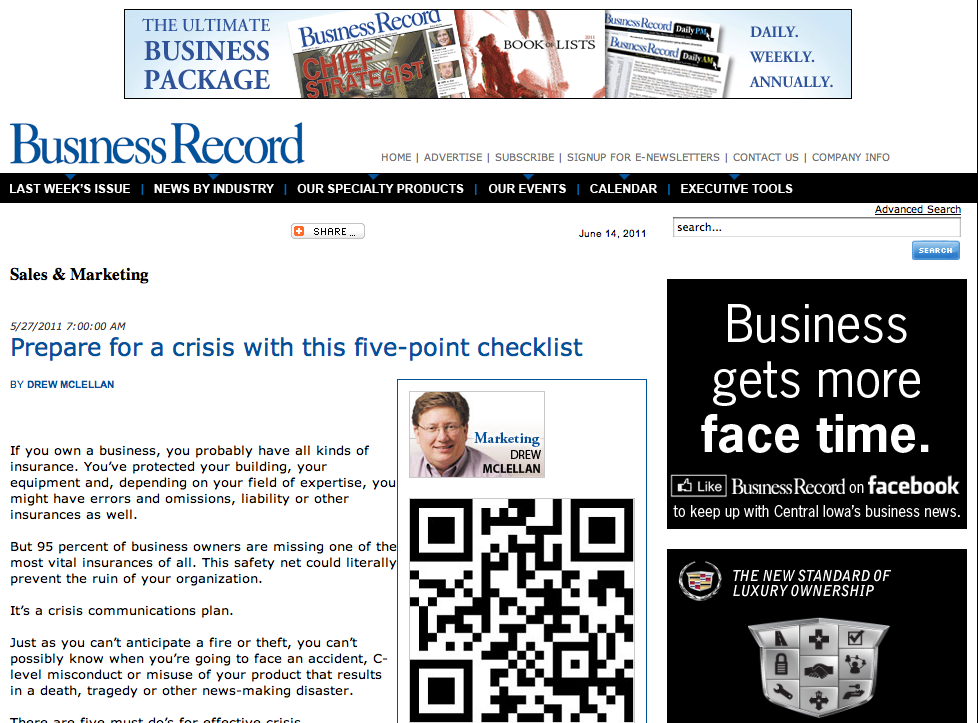
Along with the various online places where you can find my marketing thoughts, I am a weekly columnist for Iowa’s business journal, the Business Record. A few months ago, we started adding a QR code feature to my columns — to share extra resources and to demonstrate how QR codes can work. (the screen capture is of one of my columns that has migrated from their print product to their website)

When we decided to add this feature, I decided I wanted a QR code creator that was a bit more robust than some of the free sites I’d been using. We weren’t ready for custom shapes (check out these designs) — but I did want to know how many scans each code had and if there was a pattern to when the scans were occurring.

After reviewing many options, I am down to two choices. The “must haves” for me were:

  • Could create a high resolution QR code (need it for the print publication and for some of our client’s work)
  • Reporting/tracking capabilities
  • Good customer support if we had questions

The first contender is QReate & Track by InterlinkONE. They do offer a free membership/option but I opted for the $19/month version so I could get the reporting. That reporting includes:

  • Number of scans
  • Scans by day, time and month, year etc.

Really, for most local businesses, that’s plenty unless you’re going to do some serious number crunching. In terms of easy access for support, they have a forum, a blog and you can e-mail them your question. They’re also here in the states so for me, that’s a time zone advantage.

The second contender is PushQR.com from the UK. They too offer a free option but I went for the 6.99 GBP($11 something/month) because I needed to create more than 3 campaigns a month. The big difference between the two is in the reporting. With pushqr.com, I can track:

  • Realtime # of scans
  • Bounce rate
  • Pageviews
  • Unique scans
  • Time on page
  • What barcode reader was used
  • What type of mobile device was used
  • The geography of the scanner (down to the city)

Clearly a more robust reporting menu. One of the other cool features to this site is the ability to set a goal. For example, my QR code could lead you to a landing page where I offered something for sale. The goal URL could be the thank you page that you’d go to after making a purchase. Now the reporting shows me not only how many hit the landing site and where else they went — but how many did what I wanted them to do — buy something.

As for support — they have a very simple online manual to answer the most basic of questions and I can open a ticket and submit a question/request to their team.

I haven’t quite landed on the best option for us at McLellan Marketing Group yet — but both of these providers have served our purposes for now but it’s hard to argue with PushQR’s in depth reporting and lower price.

How about you? Are you creating QR codes? How are you using them? Do you have a favorite tool?

Sphere: Related Content