Showing posts with label qr codes. Show all posts

Wednesday, July 27, 2011

Gimme My QR Code!


I've had my new laptop for a month and right there in front is a sticker with a QR Code and the instructions to "Scan for product features, videos, and reviews"

I have yet to scan it.

But I'm not a busy Mom.

From Mediapost:

Moms Can't Wait for QR Codes

The word is starting to spread about QR codes. Mom blogs, magazine articles and broadcast media are all talking about the latest in convenience for busy moms. That's what it's all about when marketing to moms sometimes.

QR (Quick Response) codes have been around awhile in Japan and China, but have just recently begun to pick up steam in the U.S. and the West. If you are not familiar with them, they are the next generation of barcodes, can be printed on just about anything and deliver a wide variety of information to consumers.

The beauty of the QR codes is that they can help marketers transition smoothly into a robust mobile strategy. As over 60% of moms now have smartphones, developing a credible mobile strategy is a must for most consumer brands. Sixty percent is a big number and while most moms are just getting used to using their smartphones to check email, many more have mastered emailing photos and video and posting mobile updates to their Facebook pages. Moms, in fact, are leading the way in smartphone adoption!

As brands scramble to capitalize on this ability to be constantly connected to their target consumer -- no mean feat -- a wide variety of ways to do that seems to be popping up. I hear talk of building apps, advertising and creating mobile websites. All of these are great, but they take time to study and implement. QR codes, on the other hand, are a no-brainer. They fit into your already existing programs, cost very little and are extremely flexible at delivering information about your brand.

QR codes can be and probably should be printed on all of your current promotional materials, from billboards to POP. They can deliver something as simple as a link to your website. On a billboard, where space is at a premium, commuters can snap your QR code on their smartphone cameras (preferably not while driving) and save the link to your website to visit while on the go or save for later. What a great way to cut through the clutter and instantly have your consumer remember your message!

QR codes can deliver e-coupons right in the store when printed on your POP materials or drive consumers to the store when printed in magazines and other advertising materials. More creatively they can get consumers to "like" your Facebook page instantly, deliver digital prizes and enter sweepstakes. Their use is limited only by imagination and what you can put on a website.

While building apps is long and involved, but sexy, unless you have a really useful benefit to provide to your target consumer on a regular basis, your app is going to languish on your consumer's phone and eventually be deleted. QR codes, on the other hand, are quick to make and easy to understand -- by both consumers and management.


Maryanne Conlin is a brand marketer and award-winning social media expert. Follow her on Twitter at @mcmilker

Sphere: Related Content

Sunday, July 03, 2011

QR Code Ideas

A couple months ago I received an issue of Fast Company magazine and decided to look for QR Codes.

I was surprised at how few there were, and even more surprised at what happened when I scanned them with my phone.

6 QR codes.

3 went to the companies regular website which was not mobile optimized.

1 went to a mobile version of a company website.

1 went to a special web page that was tied to the ad.

1 would not scan at all.

Only 1 out of 6 QR codes were worth scanning, and considering that less than 10% of the ads had a QR code means either:

  1. QR Codes are cutting edge and something that early adopters will latch onto and eventually become mainstream.....
  2. QR Codes will die off because no one knows what to do with them or how to make them relevant.
I hope it's #1.

Drew offers some ideas:

Creating smart QR Codes


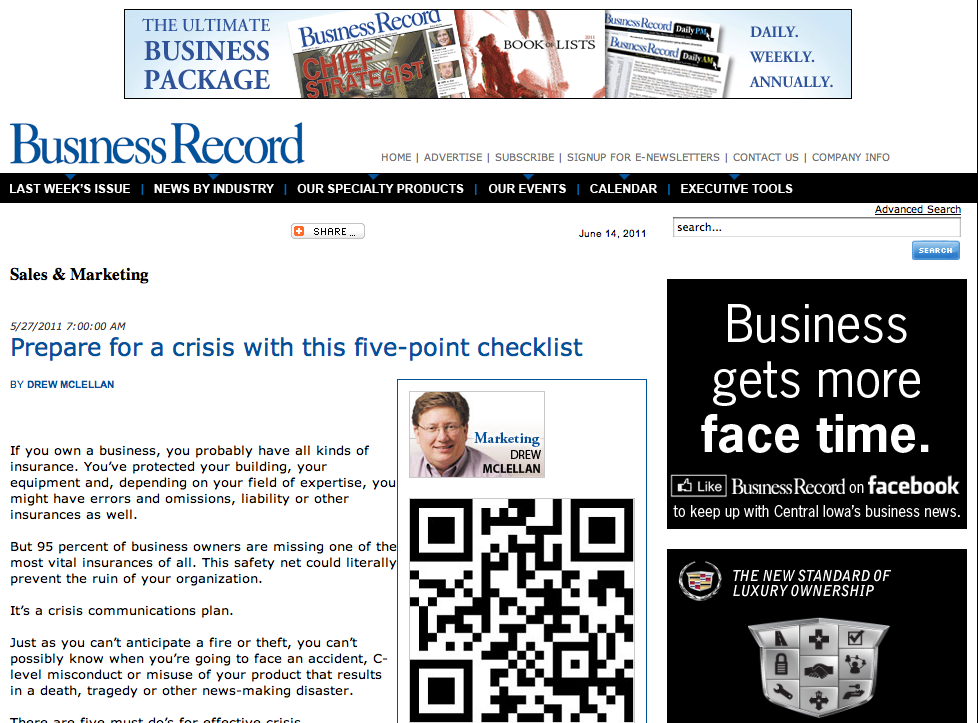
Screen shot 2011 06 14 at 11 04 38 AM
…An example of QR codes & my column

QR codes seem to be the media’s most recent marketing darling. You’ll find lots of articles talking about how to use them, including a couple I’ve written (read here and here). And in March, I shared Central Park’s incredible QR campaign to inspire you to give this technology a try.

Along with the various online places where you can find my marketing thoughts, I am a weekly columnist for Iowa’s business journal, the Business Record. A few months ago, we started adding a QR code feature to my columns — to share extra resources and to demonstrate how QR codes can work. (the screen capture is of one of my columns that has migrated from their print product to their website)

When we decided to add this feature, I decided I wanted a QR code creator that was a bit more robust than some of the free sites I’d been using. We weren’t ready for custom shapes (check out these designs) — but I did want to know how many scans each code had and if there was a pattern to when the scans were occurring.

After reviewing many options, I am down to two choices. The “must haves” for me were:

  • Could create a high resolution QR code (need it for the print publication and for some of our client’s work)
  • Reporting/tracking capabilities
  • Good customer support if we had questions

The first contender is QReate & Track by InterlinkONE. They do offer a free membership/option but I opted for the $19/month version so I could get the reporting. That reporting includes:

  • Number of scans
  • Scans by day, time and month, year etc.

Really, for most local businesses, that’s plenty unless you’re going to do some serious number crunching. In terms of easy access for support, they have a forum, a blog and you can e-mail them your question. They’re also here in the states so for me, that’s a time zone advantage.

The second contender is PushQR.com from the UK. They too offer a free option but I went for the 6.99 GBP($11 something/month) because I needed to create more than 3 campaigns a month. The big difference between the two is in the reporting. With pushqr.com, I can track:

  • Realtime # of scans
  • Bounce rate
  • Pageviews
  • Unique scans
  • Time on page
  • What barcode reader was used
  • What type of mobile device was used
  • The geography of the scanner (down to the city)

Clearly a more robust reporting menu. One of the other cool features to this site is the ability to set a goal. For example, my QR code could lead you to a landing page where I offered something for sale. The goal URL could be the thank you page that you’d go to after making a purchase. Now the reporting shows me not only how many hit the landing site and where else they went — but how many did what I wanted them to do — buy something.

As for support — they have a very simple online manual to answer the most basic of questions and I can open a ticket and submit a question/request to their team.

I haven’t quite landed on the best option for us at McLellan Marketing Group yet — but both of these providers have served our purposes for now but it’s hard to argue with PushQR’s in depth reporting and lower price.

How about you? Are you creating QR codes? How are you using them? Do you have a favorite tool?

Sphere: Related Content